
LIBRO
End to end app design for tracking your personal library

OVERVIEW
Background
Libro is an app for book lovers that will help them keep track of every book they own: ones they have read, ones they want to read, and everything in between.
Role | UX Designer
* Project for Design Lab UX Academy Course
Objective
Libro is looking to create a fresh new look for their app that is user-centric and utilizes the camera to register printed books in a more automated way via optical character recognition (OCR).
Solution
Designed a modern and user-centered design for Libro's mobile app as well as incorporated OCR for easy book tracking.
Note that this prototype was made on Adobe XD and the auto-animate transitions has defaulted to "Dissolve". I have added a video of the prototype demonstration which includes the auto-animate to view the full experience.
RESEARCH
This project is near and dear to my heart because I am a book lover myself, so I really wanted to design an app that represents me and my love for books as well as one that other book lovers might utilize to better organize their collection. I chose Competitor Analysis as well as User Surveys for my research methodologies to help me reach my research goals which were
-
Discover the patterns and trends in existing book tracking / library apps
-
Find out user behaviors while they read (i.e. write notes, highlight quotes, etc)
-
Find out how users organize their book collection
-
Determine how users discover and decide what to read next
Competitor Analysis
In my research, I explored book tracking / library apps to see what patterns and trends currently exist and how I can elevate these features.

Goodreads
A lot of great features, but very wordy UI.

Books
Mainly a reading app and exclusive to Books.

Libib
Has desirable features, but no recommendations for user.

Bookcrawler
Has recommendations from other users, but UI is outdated and confusing.

Reading List
Great features, but can't add digital books that user already owns.
User Survey
I composed a set of questions with predetermined answers that 18 participants filled out. My target audience were millennials age range 18 - 37. Here are some notable findings:
Majority Preference: Printed books, physical bookstores, and libraries
Wants: See book collection (digital and physical) in one place, friend recommendations
-
Libro will be a book tracker with OCR to scan their physical books, online searching capabilities, and e-reader syncing will be extremely delightful to keep users’ book collection in one place
-
The ability to follow friends will be ideal since friend recommendations are heavily relied upon when looking for a new book to read
-
An e-reader feature will not be included because the target audience prefer printed, physical books
These findings helped me in creating 2 personas. Meet Lex, a 24 year old administrative assistant and Tetsuo, a 35 year old animator.


INFORMATION ARCHITECTURE
Wireframe Sketches
I like to create initial sketches first to ground ideas before I get into linear work like information architecture.


App Site Map
I created this map to have a visual representation of the app’s features and how it will be organized

IDEATION
User Flow
There are 3 main tasks that I designed for Libro. These are the user task flows that the user is expected to take.

Low Fidelity Wireframes
Seeing these low fidelity wireframes helps me organize how I prioritize which features will go on the final prototype.
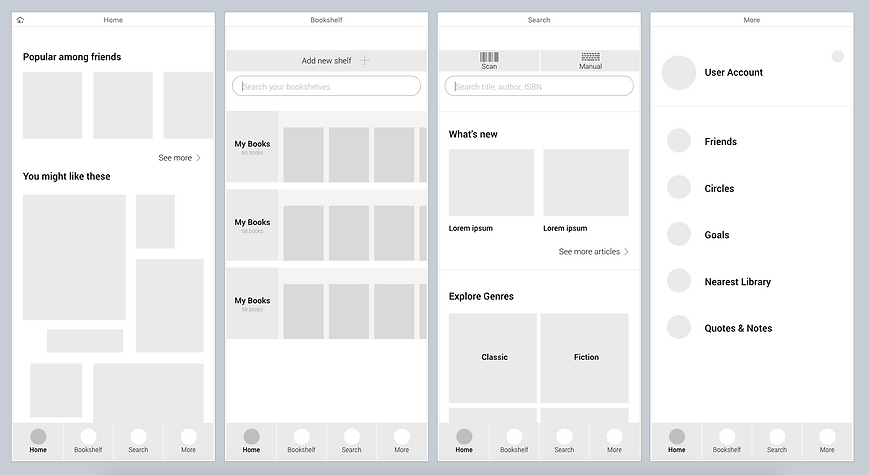
Mid Fidelity Wireframes
I referenced the low fidelity wireframes and added some iconography.

UI DESIGN
UI Design is one of my favorite parts of the design process. Creating visual context from an idea is something that I am very passionate about and wholeheartedly enjoy.
Moodboards
I created two moodboards to help me brainstorm for Libro’s branding. Each board has a different look and feel. I asked some peers for their opinions and most leaned towards “Urban”, stating that the colors "woke them up".


Logo Exploration
These are the early sketches of the Libro logo. I explored various iterations of the letter "L" as an open book on its side, some typographic logos, and one with stacked shapes in the 2 main color palettes. I eventually chose the stacked shapes since I thought it looked modern and still had that "open book" aspect be it abstract.


Libro Style Tile
I ended up choosing the Urban moodboard colors since bright colors are trendy and popular among millennials.

High Fidelity Wireframes
Fleshed out wireframes of the four main screens.

UI Kit
Gathered all of the UI elements and compiled them into this sheet. I made sure to include everything so that the next designer would be able to create any page without any trouble.


ITERATION
Another favorite part of the design process is prototyping. Seeing the wireframes come to life, and having users test it bring out my ultimate passion for UX design. Seeing my creation come to life via prototype gives me a sense of satisfaction.
High Fidelity Prototype
The first pass of the high fidelity prototype that I tested on 7 users. Here is a video showcasing what their experience looked like.

Affinity Map
7 participants age range 25 - 35
Consensus:
-
Participants had a hard time finding where to create a new shelf as well as adding a book.
Reasons:
-
The plus icon next to the search bar in the Bookshelf screen was not obvious enough.
-
Users thought that it was where they can add/scan a new book.

Prototype Iteration
This is the final prototype that I made for this project with the iterations and changes applied.

CONCLUSION
The process for designing this app was greatly enjoyable as I am a big fan of books. The passion and work I put towards this project shows through and I feel that I was able to reach my research goals in the end as well as create a fresh and user-centric branding for Libro.
If I were given more time, I would want to flesh out each page and create a highly interactive prototype.
Check out my work on Spotify
